pin lock your device

lockFor somebody who develop “Stay Unlock” utility, it’s quite an ironical that I badly need a software that could initiate a pin lock (or device lock) on demand.   Pin Lock is a small utility (just one liner code to be honest) that does that, and now I feel much safer …

you can download here

Hack more

Yeah hack more.This  is the phrase that’s always found in the online games FPS (first person shooter) game like soldier front, where the kids will always cry and whine each time they got killed by their opponents.

But this has nothing to do with  that. In fact, the title may be irrelevant to what I am trying to share in this blog post. It just happened that recently, my nephew had commented that my blog is getting boring, it’s all about mobile phones, and nothing interesting.

Generation gap?

The truth is, few things I like to share next has to do with gadgets, again! Firstly, I had just sold my Samsung i780, in anticipation for the cool HTC Touch pro. Never in my life would I have imagined getting HTC product, as I sweared after seeing how horrible their after sales service were. In all honesty, those ‘ugly’ incidents were in the past, and HTC seems to have improved on their after sales service recently. But the deciding point has to be the coolness factor found in its latest flagship models. I’m still waiting, rather impatiently I must add, for Starhub to have it available on their shop, while its competitors like Singtel are already selling the model like hotcakes over the weekend 😦  Where art thou, Starhub?

Next, I have earlier created a utility to set the “ShowSim” registry so that the SIM card contacts will not appear in WM6 phones. Upon initial feedbacks, I have enhanced it so that it will always run in the background, as it was noted that some users had experienced that the setting got reset back after a period of usage. To stop it from running, just re-run the program again, and it will stop 🙂


You may download this beta version through this link

Disclaimer: I have no physical WM phone with me to test out this version, but had been relying on emulator. 

HideSim .. another Windows Mobile Professional Hack

imageresdll_i0045_0409.png

Was bored again, and perhaps irritated. Irritated by the fact that my Windows Mobile device always shows the sim card contacts (who store contacts on SIM card these days?) each time I soft reset the phone, despite carrying out the necessary registry edit to disable the display function. So end up, I created this small utility that will run at every start up, to turn off the “Show Sim” feature. Only applicable to Windows Mobile 6.0 Professional I think, since I don’t encountered such issue when using a Windows Mobile 6.0 standard.

Here’s the Hide Sim Utility

A new version of Hide Sim Utility is updated to allow you to run the program with a time argument. The argument parameter is to denote the program to wait for a certain number of minutes before executing the “hide sim” function. The default time out is 10 sec, but if you find that after a soft reset, you are still seeing the SIM card contacts, you can try to extend the time to 20 sec.

Adding Multi Keyboard Layout support in WINCE

In desktop Windows, you can add additional native language support, which enables you to toggle and choose different keyboard layouts real time, to enter text in different language.In  Windows CE, you can install more than one keyboard layout, but you can only use one layout until you modify the registry and soft-reset your phone to activate a different layout.

There’s a way to access all the installed keyboard layouts, without having to perform registry hack and soft-reset the phone. However, it is application-dependent to add this support. And no prize for guessing that Microsoft default applications are not designed to support multi-keyboard either. Continue reading

Blink Blink with power

Yes I’m bored again, and my head was spinning with some new ideas over the weekend, on how to enhance the usability of my recent new found toy.

crystal_128_energy.png

Sometimes, you wonder if Microsoft really knows what they are doing when they build their version of mobile phone platform.  Case in point; They created the LED notification ability so that users can still be alerted on missed events such as unread SMS or missed call after a period of time (from 5 minutes to indefinitely), and yet the LED stops blinking 1 minute after the event happens.

Thinking that I could overcome this “shortcoming” easily with a little utility, I realized it is not as easy as it appears to be.

Continue reading

StayUnlock at your peril

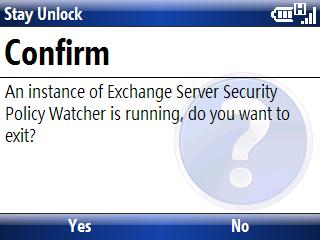
18 months ago, I created a hack utility called Stayunlock, to overcome the security policy enforced by my company, which requires me to use device lock, and disable the ability to turn off the device lock option.

18 months later, I was forced to use device lock on my smartphone because the utility doesn’t work on smartphone platform, and I was too lazy to port it over.

Many weeks back, after I lost my Treo 500v through a theft, I suddenly appreciate the value of security policy. We always take thing for granted until the day the unexpected hit us.

Just yesterday, I ported the hack utility to the WM5/6 smartphone platform, since there has been some requests on the net asking for it. Even though I have the hack utility running now, I have yet to turn off the device lock feature. In fact, I have stepped up the security further by using a more sophiscated passcode. Such is a ‘success’ story of a change management.

sshot000.jpg

sshot001.jpg

You can download the smartphone edition from this link StayUnlock (Smartphone Edition).