

Re my quicky on multi lang editor development, I didn’t spend too much time with the multi-lang editor development so one had to roll up his/her sleeve just to make it work in his/her device. Continue reading

Re my quicky on multi lang editor development, I didn’t spend too much time with the multi-lang editor development so one had to roll up his/her sleeve just to make it work in his/her device. Continue reading
In desktop Windows, you can add additional native language support, which enables you to toggle and choose different keyboard layouts real time, to enter text in different language.In Windows CE, you can install more than one keyboard layout, but you can only use one layout until you modify the registry and soft-reset your phone to activate a different layout.

There’s a way to access all the installed keyboard layouts, without having to perform registry hack and soft-reset the phone. However, it is application-dependent to add this support. And no prize for guessing that Microsoft default applications are not designed to support multi-keyboard either. Continue reading
Following the Bluetooth notification hack that I did few years ago for my previous iPAQ 6965, I created another “hack” last week to overcome the notification deficiency in my new Samsung i780. Well not exactly a hack, more like a workaround to keep the LED blinking when the phone attempts to get into sleep mode. Continue reading
Yes I’m bored again, and my head was spinning with some new ideas over the weekend, on how to enhance the usability of my recent new found toy.

Sometimes, you wonder if Microsoft really knows what they are doing when they build their version of mobile phone platform. Case in point; They created the LED notification ability so that users can still be alerted on missed events such as unread SMS or missed call after a period of time (from 5 minutes to indefinitely), and yet the LED stops blinking 1 minute after the event happens.
Thinking that I could overcome this “shortcoming” easily with a little utility, I realized it is not as easy as it appears to be.
Every time I get a new Windows Mobile phone, I have to hunt for a Chinese input solution that supports qwerty keyboard properly. I have trying to find a workable solution for my i780, and while A4, PlumSIP and GuoBi can be installed and used on my device, but they introduce some ‘side effects’ that makes me look elsewhere for better solution.
I did some web research and finally came to a conclusion that I can make use of some DLL files that I believe originated from Microsoft. Packaged them with proper registry settings, I can now finally type both Chinese and English text using my qwerty keyboard. The only issue is the symbol input button has become invalid, at least for now, but that’s not a big deal for me.


Samsung launched its flagship qwerty product, Samsung SGH-i78,0 a couple of months ago and it has been the talking point in the “geek” town. Having tried its previous qwerty models, I had my reservation. The impressive technical specification and corresponding internet reviews, however led me to take a huge step. I finally sold my trusty Motorola Q9h and got myself a Samsung i780. So is this ultra slim Microsoft Windows Mobile-based smart phone liveing up to its reputation? After using it for a few days, here’s my take;
Yeez had been working late for the last few days, and today was no difference. Instead of going home alone, I decided to drop by Vivo City’s Samsung retail outlet to take a second look of Samsung i780, to spend my time off. . I ended up checking out on the latest Samsung’s Omnia. And I got to say, it was a time well spent!
I got to first put a disclaimer, that the next few paragraphs merely recapitulate my first impression of the gadget, after a brief 20 minutes fiddle. Yes, I was playing with the phone for 20 minutes, oblivious of the people around me trying to get their hands on the demo set.

In my last review of Motorola Q9h, I lamented about how Motorola (to be fair, quite a number of Windows Mobile Phone makers as well) could have launched a device without appropiate chinese input method editor (IME) in a multi-racial countries like Singapore.

Wrote in to Motorola customer service department before, and as expected, I was given excuses like “We do not support third party software” or “None of our Q9h comes with chinese IME”, etc.
Hello? You mean Motorola is not interested at all in the North Asia Market? Plus, I was told that in Hong Kong, they do sell Q9h that supports chinese input. So the official reply, like all other official replies I get elsewhere, is just crap.
Recently, I “come across” a Q9h, which evidently dismiss the claim by Motorola that there isn’t a Q9h that supports chinese IME out of the box. Let’s just say I am 100% sure that the Q9h that I come across, is 100% stock and has no additional software installed.
Incidentally, the software is developed by GuoBi (国笔科技有限公司), the same company that partners with various phone manufacturers in the world for chinese input function, and the same software can be found in Q9h predecessor, Q8. 😉
Had it for 2 weeks, and took a short video of the phone itself. More detail review to come later!
18 months ago, I created a hack utility called Stayunlock, to overcome the security policy enforced by my company, which requires me to use device lock, and disable the ability to turn off the device lock option.
18 months later, I was forced to use device lock on my smartphone because the utility doesn’t work on smartphone platform, and I was too lazy to port it over.
Many weeks back, after I lost my Treo 500v through a theft, I suddenly appreciate the value of security policy. We always take thing for granted until the day the unexpected hit us.
Just yesterday, I ported the hack utility to the WM5/6 smartphone platform, since there has been some requests on the net asking for it. Even though I have the hack utility running now, I have yet to turn off the device lock feature. In fact, I have stepped up the security further by using a more sophiscated passcode. Such is a ‘success’ story of a change management.

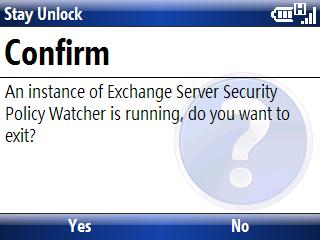
You can download the smartphone edition from this link StayUnlock (Smartphone Edition).
 zen online journal