New work on PointUI Home2

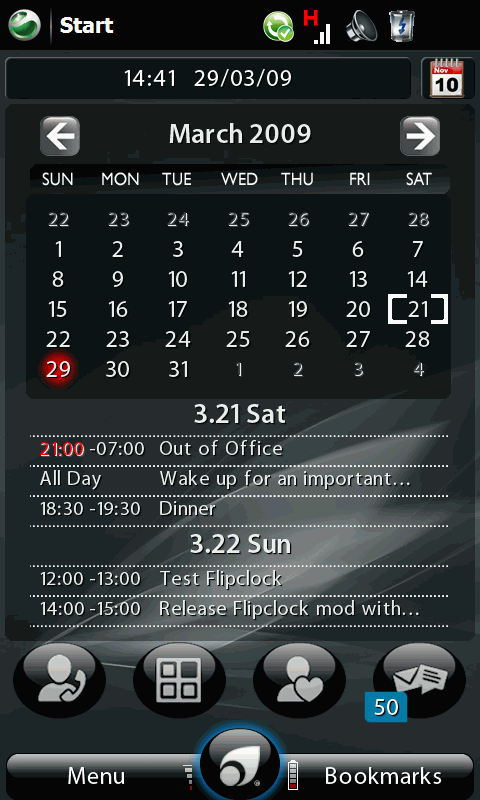
About a month back, PointUI finally announced their release of Home2 software, a Windows Mobile shell application that replaces the boring but functional Today screen. It was impressive to say the least, in terms of its performance and potential. However, the lack of applets means it’s all show and nothing beyond  in terms of making the phone device more productive.

That said, within weeks, there are  more and more third party developers began to create and release new applets to complete the usability of the shell program. Clock,  Messaging, Weather, Stock Ticker, Task, Appointment, etc are just some of the applets released by the developer community. Yours truly, shamelessly join in the bandwagon, and created a calendar and appointment applet, which can be found here
nothing is better than SE-X

I am talking about the latest gadget in town, Sony Ericsson Xperia X1. What were you thinking?

Perhaps it’s the hype of Xperia, I felt so compelled to experience it when Sony Ericsson finally launched it on 1st November, 9 months after it was first announced.  So I drove down to the Sony Ericsson concept store, on its launch day. My first impression of the phone, was not exactly a “love on first sight” kind of feeling. The phone does look cool on first look (so was the cute sales executive), but my primary concern (as with any other phones) has always been the keyboard and therefore I spent quite a lot testing the keyboard rather than fiddling around its other uber cool features.
Continue reading

Xperia Xperience

I confess, the temptation of new Sony Ericsson Xperia X1 is too much for me to resist.

That said, my first impression of the phone, was not exactly a “love on first sight” kind of feeling, as I dropped by Sony Ericsson concept store to check out the the phone. The phone does look cool on first look (so was the cute sales executive), but my primary concern has always been the keyboard and therefore I spend quite alot trying to experience the keyboard rather than fiddling around its other uber cool features.
Continue reading

A pro touching a Touch Pro

I thought to myself, perhaps the best way to do a mini review on my recent gadget acquisition, is to do write the review using the mobile device itself. It will be a real acid test

to see if the gadget lives up to its name as a truly convergent device, a device that simply allows you to do more than the usual telephony and PIM (Personal Information Management) stuffs you normally find on a typical phone and pda separately and respectively. So the golden questions are … Continue reading

Multi Language Editor – make it easy

Found out that my Multi Language editor was not orientation aware, so decided to make the necessary changes. It ended up with an additional feature that allows one to configure the keyboard settings through a user interface, instead of having to fiddle on the registry as in the previous version. In the setting user interface, you will be able to choose the preferred primary and secondary input methods (which usually correspond to a distinct keyboard locale/layout) The primary choice will also be set as your system default keyboard locale accordingly. The latter will be useful when you install third party IME software, as the installation usually overrides your factory default setting, in terms of the keyboard setting.


You can download from this link

Stay Unlock goes 2.0 after two years

Since I developed Stay Unlock two years ago, it had received numerous feedback. I had also started the habit or was it a hobby, of developing small software utilities to do stuff that default Windows Mobile does not provide, e.g. Bluetooth Notification hack, and most recently LED notification. From applying my knowledge of Windows Programming acquired 10 years ago in Windows Mobile development, I have also finally decided to take the opportunity to explore C# and .NET programming. For sure, these development toolkits make development life of a Windows Programmer much easier, as compared to say 10 years ago. You always learn something new but it is also important that you know the fundamentals!Anyway, inspired by the comments from Stay Unlock users, I have decided to pull forward the upgrade effort which I had originally planned for during my year  end vacation (now it looks like I can take a good break in December!). It took me a day, and I’m hoping that it will be useful for existing users of Stay Unlock, although I know during the last one year, many variant of Stay Unlock had surfaced. Continue reading

pin lock your device

lockFor somebody who develop “Stay Unlock” utility, it’s quite an ironical that I badly need a software that could initiate a pin lock (or device lock) on demand.   Pin Lock is a small utility (just one liner code to be honest) that does that, and now I feel much safer …

you can download here

HideSim .. another Windows Mobile Professional Hack

imageresdll_i0045_0409.png

Was bored again, and perhaps irritated. Irritated by the fact that my Windows Mobile device always shows the sim card contacts (who store contacts on SIM card these days?) each time I soft reset the phone, despite carrying out the necessary registry edit to disable the display function. So end up, I created this small utility that will run at every start up, to turn off the “Show Sim” feature. Only applicable to Windows Mobile 6.0 Professional I think, since I don’t encountered such issue when using a Windows Mobile 6.0 standard.

Here’s the Hide Sim Utility

A new version of Hide Sim Utility is updated to allow you to run the program with a time argument. The argument parameter is to denote the program to wait for a certain number of minutes before executing the “hide sim” function. The default time out is 10 sec, but if you find that after a soft reset, you are still seeing the SIM card contacts, you can try to extend the time to 20 sec.