Software Programming and Cooking

Apart from the incidental choice of word “Cooking” to describe Windows Mobile ROM development process, I found out that recently there is really a great similarity between software programming and cooking.

With cooking, you master the science of key culinary skills, and then with some creativity,  you venture into dishing out different cuisine. I am not a food connoisseur, so you don’t expect me to go into details on this, but you should get the point.


Now, turning over to software programming (oh my, I suddenly feel so at ease), there is alot of similarities. You need to master the fundamental programming techniques, and you exposed into different type of programming; UI programming, Web programming, Data integration programming, Kernel programming .

And yes, recently I had ventured into kernel programming, something I have never imagined in the past. The reality though is that I was just meddling around with the Linux kernel source, thanks to  Opensource.

So I looked at the various kernel source codes published by various xda-developers, each of which addresses different aspect of kernel improvements. I decided to make a kernel that takes the best of all. The end product is one kernel that incorporates sztupy‘s Universal Lagfix, supercurio‘s Voodoo display tweak (Gamma and Sharpness enhancement), raspdeep‘s overclock and undervolt, and hardcore/ykk_five 341MB memory hack.

Universal Lagfix addresses the poor performance  inherent in Samsung’s original RFS-based storage. The fix is about reformatting specific data partitions into Linux ext4 format, and by doing that, you can expect 200-300% of improvement. The applications no longer run with intermittent freezes (caused by the lag in the file system access), and responses are therefore almost instantaneously.

So one would think, with a 200-300% improvement in performance, what is there to optimise further?
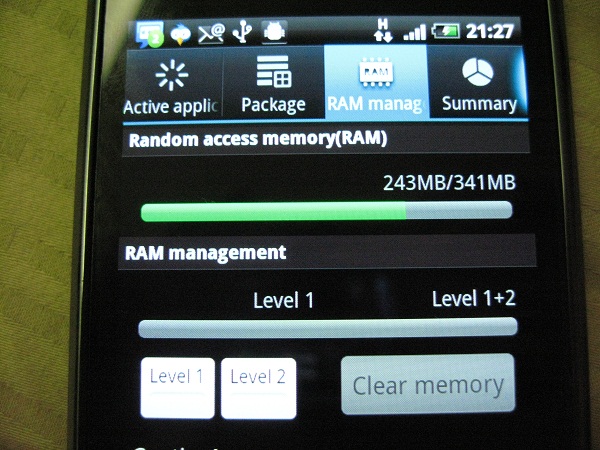
Now Samsung Galaxy S comes with 512MB of RAM, as you would expect from a top tier smart phones in the market. The problem with Galaxy S, is that the amount of RAM available for end user, is only 304MB. There are more than 200MB of RAM reserved for the system, such as video, android OS, etc. It didn’t help when Android has a bad habit of loading installed applications and widgets on start up, which means by the time your phone boots up successfully, you would be lucky to have 80MB RAM free for use. Now in Froyo, the memory management is far more robust than Eclair, but still, with a limited amount of free memory, you end up having frequent memory clean up performed by the OS, resulting in unnecessary instability in the system.  Both ykk_five and hardcore researched and figured out the kernel configuration for reserved memory. With some trial and error (as eliminating memory reservation causes problem with certain applications such as video recording or 3G video call), the folks in xda-developers established the optimal memory configuration. The result is 341MB of available memory (as compared to 304MB). That ensures some stability much needed in the Samsung Galaxy S.
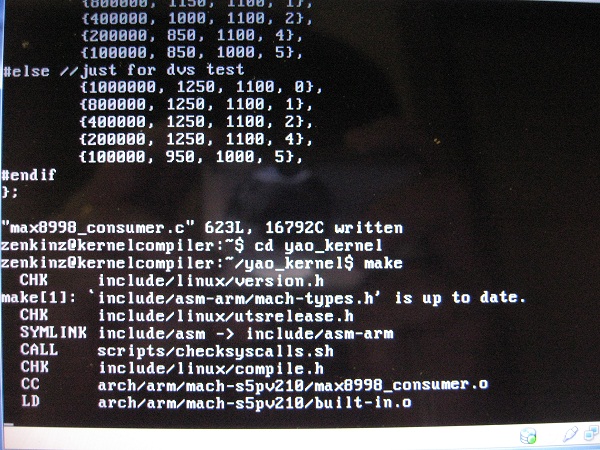
And you would think by now; Samsung must have done something wrong if any more tweaks can be uncovered. You bet! The question now is how much have we optimised the  Cortex A8  processor, i.e. the brain of Galaxy S.  When looking at the kernel source code, folks have figured out that there are compiler flags we could use to compile the kernel to take advantage of the A8 Cortex CPU architecture. Not only that, the team has figured that the CPU can be over-clocked, just like how the PC geeks would have done to their desktop processors.  Additionally, the CPU is currently running at a voltage level that can be further tweaked, i.e. reducing the voltage consumption value  for each CPU frequency step. The end result, is a turbo-charged but super “air-cooled” (and efficient)  Galaxy-S. Unfortunately, there is no real tool out there to measure CPU voltage consumption scientifically, so one can only rely on feel (e.g. lower temperature) and experience (battery consumption level). That said, the under-volt tweak is still being refined as we speak, just to determine the optimal level of voltage that is low enough but not at the expense of CPU running reliably at the desired frequency.

The final installment of the tweak is display. supercurio had definitely done far more research than anybody in xda-developers, and probably even in Samsung development team, to improve on the display gamma and sharpness. More explanation can be found in his web-site, so I wouldn’t regurgitate what has already been documented.

And of course, there are some minor tweaks I did along the way, as I touched the source code for the above tweaks. However, these are experimental at this point, it’s probably not smart for me to disclose until I can conclusively determine the value of such tweaks.

Did I mention the code name of the kernel I have customised? Yet Another Optimised Kernel (YA OK!) … So go flash this kernel  if you happen to own a Galaxy S (sorry only for Europe and Asia Galaxy S owners) and want to turbo charge your phone. You will be surprise how buttery smooth your phone is, and it is definitely much faster than the Voodoo’ed Galaxy S I had awhile back.

Here’s a quick video capture of my Galaxy S running on YA OK Kernel. Enjoy.

Samsung Galaxy S – Can it ever be a brick?

In the techie world, the ‘brick’ is usually associated to the state of your phone, where no matter what magic you try to apply, your phone  cannot be powered on at all. It is therefore no better than a high tech paper weight, or a brick if your phone happens to be one heavy phone.

Well, I thought my recently acquired Galaxy S was bricked yesterday.  It’s almost unthinkable that a surreal phone sitting in front of me was staring at me like a brick. I had previously flash a corrupted kernel or interrupted the flash process, in all cases, the phone will just show a broken flash icon when I tried to power up the phone. The phone was recoverable in every incident, since I could bring the phone back to the “download mode” (i.e. bootloader mode),  which allows me to re-initiate a firmware flash.

But not yesterday. I updated one part of the firmware, the flash process was successfully executed as indicated by the Odin flash application, and the phone was expectedly rebooted. But lo and behold,  the phone did not wake up at all after the reboot. It stayed powered down, no display, no sound, no sign of phone trying to “breath”. Not even an icon on the screen that says corrupted firmware. The phone did not even react when I attempted to put it back to the “download mode”.

Thinking that the phone has just coincidentally run out of battery, I decided to put the phone on charge but but it was still no go after few minutes. As I tried to recap what I have done, I realised that I had done something a noob would not have done. I had ticked on “re-partition” option prior to the flash process in Odin. Coupled with the fact that I was flashing the CSC image (one part of firmware that provides operator specific configuration and/or software).  Consequently, the phone had its entire system storage re-partitioned and end up with just that CSC code, without the remaining code, not even the kernel.

It was 1.30am at that particular moment, I reckon my sleepy head must be the reason behind this stupid action of mine.  What I couldn’t comprehend, is how can this screw up impact the bootloader, which is responsible for controlling the phone action during the boot up. One thing certain though is that I had completely woken up as a result.

For a good 15 minutes, I have been thinking all possible remedies, including removing the battery (albeit doing it very quicky) and putting it back to restart the phone.

I was almost resigned to the fact that my phone has become a $950 paper weight. But being a stubborn person (or one who perseveres, depending on how you look at it), I did not like the idea of throwing in the towel. I remembered how my father would spend the entire night till morning, just to fix some simple computer glitches when I was a young boy. I think I might be like him for that night.

Then I was enlightened. I observed that in those attempts when I was trying to put the phone into the “download-mode”, the phone might already be in panic-boot mode. While I had removed the battery and put it back to restart the phone, it was done so quickly that the state of the memory may not have totally erased.

So there I went, took out the battery, left the phone for a minute, put back the battery, and powered on the phone into “download mode” right away. Lo and behold again, phone is alive again! I almost yelled with joy .

And the moral of the story?

Never do any “not for weak heart” tasks, and firmware flashing for that matter, in the wee hours of the day. You would end up staying wide awake for the whole night, regardless of whether the end result is positive or not.

On a lighter note, it appears that it’s impossible for Galaxy S to end up as brick. Not unless you literally make it to be so.

Htcardware vs Samsungoftware

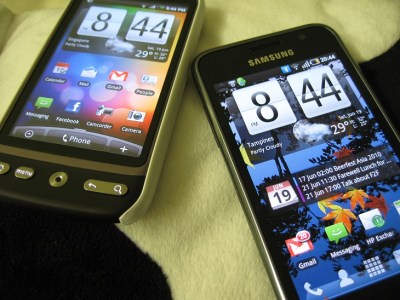
I have been asked a number of times which phone is better, Samsung Galaxy S, or HTC Desire, both of which I had done some review on in the previous blog posts.

Here’s my thought.

At the end of the day, the choice is very personal, there’s no good or bad device, it’s more like if its right choice for you, based on your requirements.

For me, Samsung triumphs in the hardware department (except for maybe the lack of camera flash), whereas Desire wins hand down in the software aspect.

For me, you can address software gap with workaround (sometimes better, sometimes not as good, but its a good workaround), but you can’t say the same for hardware.

For e.g. I was blown away by Samsung camera capability, whereas HTC Sense mesmerized me without a shadow of doubt. I can emulate HTC sense in Samsung Galaxy S via Launcherpro (much better than Sense imho!) and widgets like fancy widget (not as functionally complete but its a good bridge), but I can’t emulate the video taking capability *anywhere near* Samsung Galaxy S in HTC Desire.

Galaxy is surreally desirable

Having tasted my first real Android experience in the mold of HTC Desire, I had another opportunity to lay my hands on Samsung’s new Android flagship product, Galaxy S. I am not sure what does the “S” means, but one cannot be faulted for assuming it is  Galaxy “Supreme”, based on its technical specification, and my initial impression of the phone.

In my short 20 minutes hands on, I was deeply impressed by its form factor and its captivating Super Active-Matrix Organic Light Emitting Diode (Super AMOLED) screen. First of all, it’s thin with a 4″ wide screen, a size that I feel more comfortable after having used to HTC HD and HTC HD2, which have screen size of 3.8″ and 4.3″ respectively. I just find the 3.7″ screen in the HTC Desire, a tad too small for me.  The Galaxy S has  just the right size, and to top it all, it is only 9.9mm slim and weighs only 118g. My only gripe is its piano-finishing battery cover, which is going to be a fingerprint magnet. The fact that the battery cover is made of polyurethanes material, doesn’t make it any more “cheap plasticky”, as I thought the overall build quality is solid.

Now the screen; it looks  stunning to the naked eyes, but once I put it side by side against HTC Desire, with the brightness level maximised for both devices, I find the difference is marginal, if any. I suspect the main reason behind this nano difference, is Samsung’s decision to maintain similiar brightness level, so as to maximize the power consumption efficiency. Afterall, a Super AMOLED screen is statistically capable of achieving 20% better brightness at 20% lesser power consumption level, in comparison to a AMOLED screen.  So if Galaxy S is designed and manufactured at the same brightness specification  as the AMOLED screen, then mathematically one can achieve 33% reduction in the power consumption. Not bad!  (Note: I did observed that the power consumption in Galaxy S much better than that in Desire. It’s not scientifically proven though that it is due to the above mentioned theory, but if anybody can confirm that, please let me know)

In the end, the brief experience was enough to lure me into the Samsung Galaxy S camp. So I got a set a few days later, and begin my Android journey, ehm,  officially. Afterall, the HTC Desire is technically a “T-loan” unit from yeez, and my other Android experience was really Android Cupcake half baked into my old HTC HD.

Having used the phone for the last few days, my conclusion of Galaxy S and Desire comparison is basically  hardware versus software. It is without a shadow of doubt that Galaxy S just shines in almost every aspect of hardware departments, except maybe the flash-less camera (and if I want to be nitpick, lack of LED notification light). I can however forgive the lack of flash, for its superb video taking capability. On paper, it can take 720p video at 30 frame per seconds,  but what counts at the end of the day is the actual quality of the video captured in reality. And I have to say it is almighty impressive, as it  could take a good video without any ghosting effect. Probably the best video capture capability I have come across for a smart phone.

Now, when it comes to software arena, HTC Desire is the clear winner by a mile. HTC sense  and its  home screen widgets,  spice up the otherwise default boring android home screen. One can draw the similarity from the  Windows Mobile devices; that without the Windows Mobile version of HTC sense, it is ladened by a functional but very dated Today screen. HTC has established itself as a smartphone leader, not because of its superior hardware specification, but its ability to mate the hardware and software (regardless of Android or Windows Mobile platform) to address the different needs of various mobile market segments. Samsung, on the other hand, has tried too hard to emulate iPhone, loosing it s own DNA. Its  TouchWiz user interface and the bubble style conversation for text messagin, are just some examples of that. Thankfully, there are applications like  LauncherPro, which can reinstate the iPhone wannabe back to the real android Galaxy S where it should be.

Desire over HD2

I have always have the desire to learn about (mobile) life beyond Windows Mobile,  after having owned numerous Windows Mobile devices for the past 5 years. Then came iPhone, in 2008. But despite its edge cutting user experience and its hundreds of thousands of (useless) applications, it didn’t wow me over. I admit I’m not a big fan of Apple, but that has nothing to do with me not joining the fruity camp. I think it’s a great mobile product to start with, and had redefined the usability of mobile devices. It forces telco to sell data plan as a mainstream service. There’s many good things about the consumer focused phone, but just not enough to replace the likes of my trusty Xperia, Touch HD and subsequently HD2 as a productivity phone.


Then few months ago, I had a taste of Android on my Touch HD, albeit booted from Windows Mobile using haret (just think of it as a PC that can dual boot between Windows and Linux). I thought Android was an unpolished product then, with a great potential to woo over die hard Windows Mobile users.

In the past 6 months, many Android based phones had launched, but they were either too small for my fat fingers, or did not look appealing to me. Most importantly, until Android 2.1 (or Eclair) was released, there was no good way to integrate Android with Exchange Server backend.

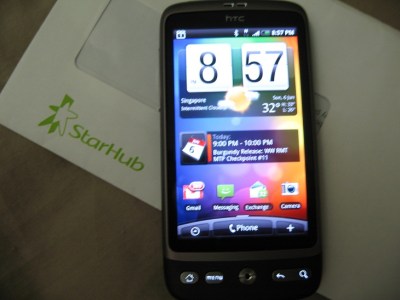
Last month, a couple of new Android Eclair phones were launched, and one of them caught my attention. The phone “Desire” is so aptly named. Sporting a screen of 3.7″ size, running HTC sense and most importantly has support for Exchange Server integration,  it looks like a good phone to replace my HD2, which had been on steriod for the past few months.

So when Yeez decides to renew her telco contract, I shamelessly offer her my professional service to set up her HTC Desire, and in the process, for her to experience the steroid boosted HD2 and for me to test-play her HTC Desire for the next few weeks. 

But it took me 2 weeks before I could lay my hands on the desirable phone, as the phone was out of stock island-wide since day 1 due to its overwhelming demand and conservative supplies from HTC (as I understood HTC allocated only 100 units to each telco on day one of its release). Fast forward to yesterday, upon first powered up,  I was first greeted by the familiar shell interface, HTC Sense, which has been around in other HTC Android and Windows Mobile phones. The Android version of the HTC Sense supports a wide variety of widgets, and I believed it is based on Android App Widgets framework. This is a big contrast to the Windows Mobile version of HTC Sense, which has been developed from ground up, based on Lua scripting language. Ok, it sounds little too techie here, but bottomline, you should be able to customise the Android version of HTC sense with other non HTC-sense widgets easily. In the Windows Mobile camp, you would need skilled developers to custom build additional “home tabs” which will only run on HTC-sense powered Windows Mobile devices. That said, I am alittle annoyed with the fact that I can only have 7 “widget screens”, even though I could work around that “limitation” by choosing different “Scene” (each scene has its own set of home widget screens configured).

Installation of third party applications into HTC Desire, like any other Android phones (and iPhone if I’ve to be politically correct), is seamless through Android Market.  I installed a few applications, including big installation packages such as NDrive.  There are some installed applications such as SMS widget counter, File explorer,  Bluetooth transfer app, etc which I deemed basic and should be part of the Android base system. Or maybe I have been spoilt by Windows Mobile for the last few years. On the otherhand,  there are good applications such as Tapatalk which I had been hoping for during  the Windows Mobile  days, and I reckon the lack of “easy to use” UI SDK as the main reason why developers are slow in porting their applications to Windows Mobile.

Applications aside, setting up HTC Desire was a breeze, in particular setting up Exchange Server account for my push mail needs. In a few minutes, all my company mails, calendars and contacts were downloaded to the phone. While the PIM features in Desire (or Android phones for that matter) is not as extensive as that in Windows Mobile, it’s  more than adequate for one to connect to workplace, e.g. scheduling a meeting with a list of  invitees,  setting out of office,looking up company’s global address book, etc. And because I had setup my HD2 favorite people previously, the Desire’s favorite widget screen shows the same list of favorite contacts after synchronising with the exchange server. Neat!

Now here comes my biggest gripe(s),  to date. I always pin-secured my phones, and its no different for HTC desire. The problem with HTC Desire, and possibly for any other Android phones, is that if I choose to have numeric pin, I would still face a full qwerty keyboard to enter the pin when I try to slide unlock the phone. It may sounds like nitpicking, but just imagine you have to tap 8 key codes quickly every time you turn on the phone to make a call or do a quick read of new messages. It didn’t help that Android phones (or at least for HTC Desire) seem to have only one single power management mode; regardless of whether the phone is on external power source or battery, or whether the phone is idle or running some active services.

Apart from these gripes, there are other small nags such as occasional screen lags, inability to have full access to application configurations (probably require rooting). Still, I think it has been a refreshing experience, and is the smart phone that is capable of replacing my HD2. This is even more so with the next version of Android, Froyo,  rumoured to be available for HTC Desire in a couple of weeks time, and reportedly to be 5 times as fast as Eclair. Of course, since its made by HTC, one can easily head over to xda-developers to satisfy ones desire for the dark side.

Merlion NG v1.61 creates its own milestone

Ever since I started building the new series of Merlion Leo ROM, I started to see more interest probably because it’s based on the new Windows Mobile 6.5 platform. Lately, I have updated the ROM with newer version of drivers and the necessary configurations,  and that  was a huge performance booster!

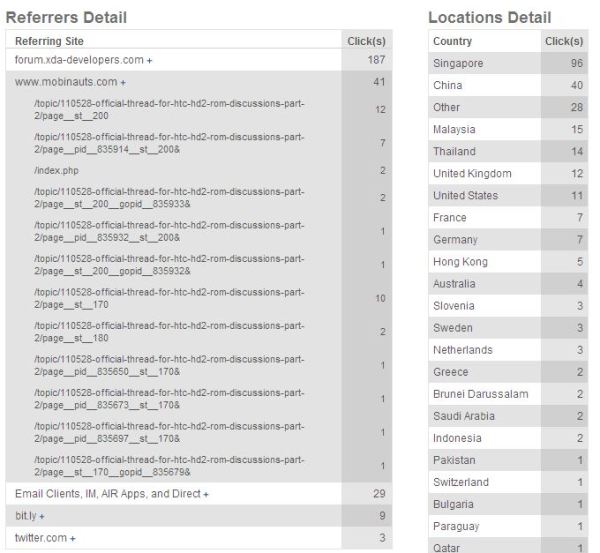
There must be some correlation between the number of clicks the ROM download link got, versus the performance of the ROM. Within 2 days of release, it got more than 200 of clicks. Okay, not a great deal for the mainstream  ROMs like Miri or Energy, or the actual download is approximately just 3/4 of of the clicks. Regardless,that’s a significant milestone for Merlion NG series in my humble opinion.

The demographic of my user base is pretty much expected. Since I have build the Chinese Simplified Input/Display support, I would naturally anticipate most of the users to come from a Chinese populated location. So users from Singapore & China made up close to 60% of Merlion NG series total user base. What’s interesting is I do have users from the Europe & Middle East countries.

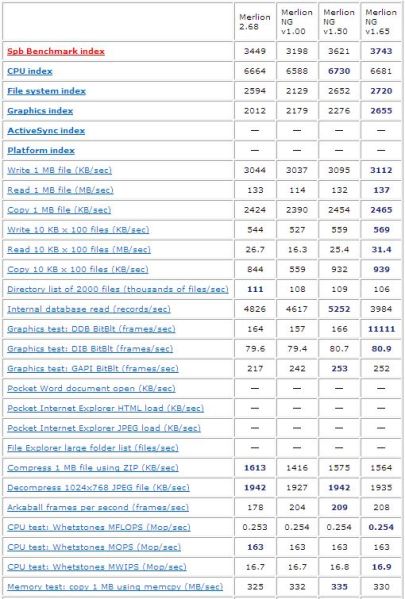
If you have not flashed the latest Merlion NG series ROM (v1.65), you should because you never know what you have been missing until you have tried it. Some had even described the ROM to be on steroid,  or on drug cocktail!  Don’t believe? See the below performance chart of the NG series ROM performance.

If the chart above does not give you much context, just imagine this. A stock (i.e. official) ROM would only achieve a total SPB benchmark index of 1590. In comparison to the latest release of Merlion NG series, the latter is 2 times faster! Even for the first generation of Merlion series, v2.68 is generally one of the better performing ROM among the rest of HD2 custom ROMs, so I will not be surprised, if we were to put a ranking table to compare the performance of all the custom ROMS in xda-developers or htcpedia, Merlion NG series should be in the top ranks, if not right at the top 😉

Merlion Leo goes next gen

After a week of burying under work, I finally begin my long weekend by building my Leo ROM using the latest Windows Mobile 6.5 COM5 platform (build 23554)

The cooking process was smooth sailing and the result is quite satisfactory. Please head over to the XDA developer thread to follow the development progress, if you are keen to try it on your HD2.

HP InstantWeb on mini netbook

My sister-in-law bought HP mini netbook recently, and I helped her to setup over the weekend.

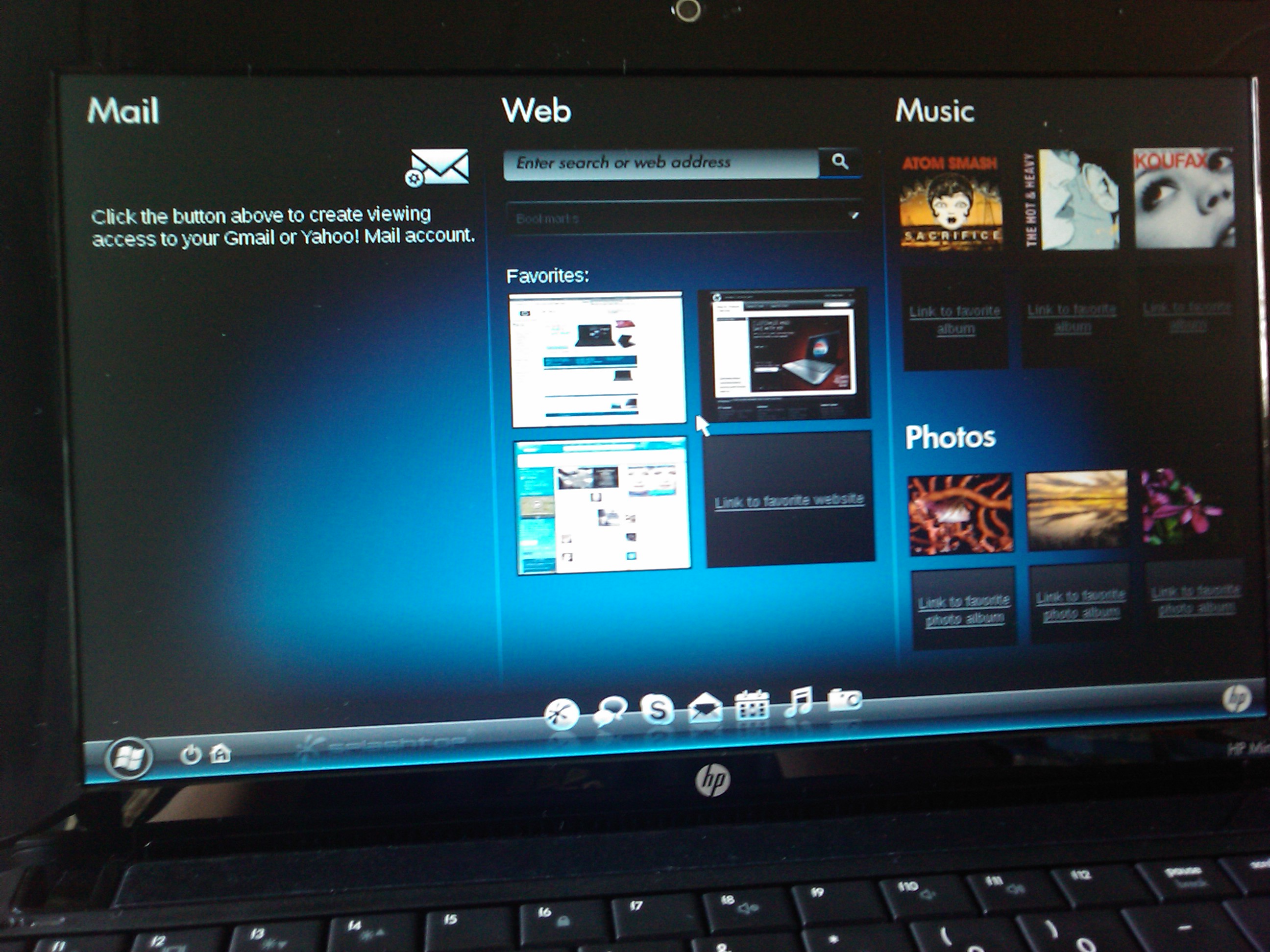
I was pleasantly surprised to see HP InstantWeb application pre-installed in the netbook. Firstly, I have read about the application from the internet but this is the first time I have seen it in person. Next, I thought it’s cool for HP to custom build this small application that enables user to quickly access email or web surfing without having to wait for a long boot time. Although Windows 7 has improved the boot up time significantly (works out to be around 40s on my laptop running on 64bit Windows 7 Ultimate) , it’s still considerably slow for a mini netbook.