Another .UI applet on drawing board

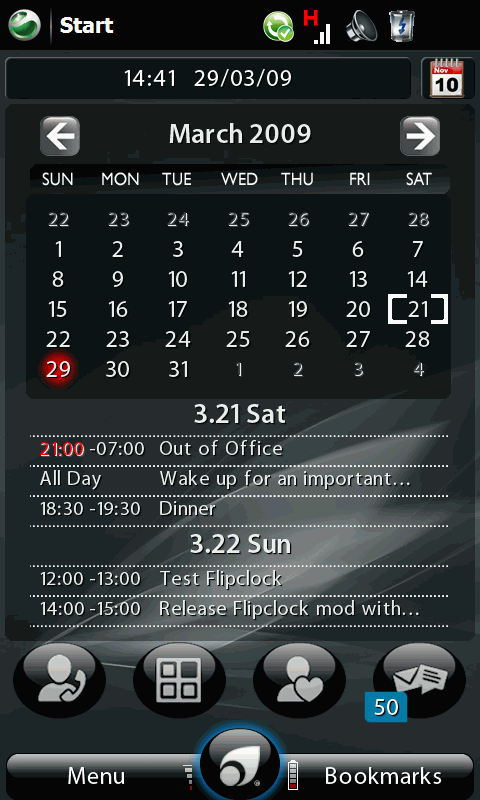
It looks like I’m getting a hang of developing applets for PointUI. After making my first .UI calendar applet, my mind was toying with the idea of creating my own “Home” applet for .UI Home2. Since I’m creating a Home2 Home, I have decided to name it as Home Cube. 


sshot000_1

One of the things I had wanted to include is a better flip clock animation. Coding was rather straight forward, although graphic wise it was abit of challenge and in the end, I decided to reuse the graphics rendered by the original Flipclock applet developer. 
Continue reading

Calendar applet for PointUI Home2

Weekend has always been short, but I still managed to find some time to update my Calendar applet for PointUI Home2 

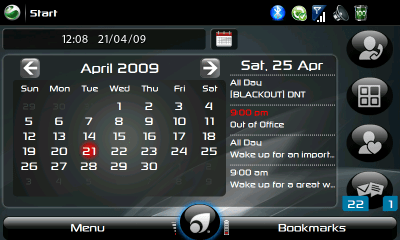
Calendar main view (landscape)

Version 1.6 is finally released. Here’s a quick summary of the fixes, enhancements and added features.

April-21: version 1.6 beta-1 download link for VGA/WVGA and QVGA/WQVGA

  • Fix: Today indicator and text does not automatically get updated (when a new Today occurs)
  • Fix: Bug in the appointment area which always default to year 2009
  • Enhance: Optimize performance esply when you switch from month to month
  • Enhance: Improved UI for All Appointment/Day view
  • Added: Variable size applet support (applet now make use of the available applet space, based on your setting such as full screen, search button, etc)
  • Added: Landscape support (for wvga screen, the appointments will show on the right hand side of the calendar)
  • Added: Year view to select and jump to the month calendar view
  • Installation Prerequisite: Home2 0.30b must be installed
  • Installation Note: Install the CAB and add the calendar applet from the applet screen. The loading time of the applet could take a few seconds but this is only when you first add the applet, or when PointUI is starting up. Copy theTheme.XML file to your active theme folder for optimal display

Continue reading

Calendar Applet (version 1.5) for PointUI Home 2

April-11: version 1.5 beta-1

  • Fix: Today indicator and “Today”/”Tomorrow” text not updated after a day
  • Feature Added: Animation while loading calendar and displaying appointment summary on main screen
  • Feature Added: Tapping on the appointment date (under the calendar) brings up screen that shows all the appointments for the selected date. The appointments are paginated (4 per screen) and you can swipe left/right to navigate from screen to screen.
  • limited support for VGA/QVGA device
  • Installation Note: Backup/Remove the calendar folder, Run Calendar-1.5-b1.CAB in your device’s file explorer. Copy Theme.xml to your active theme folder


Download Links

QVGA and WQVGA devices: Download

VGA and WVGA devices: Download

Buried to distract

It started all so positively in April, but for the last 1 week, it’s a hope that crushed big time.

The best treatment to the disappointment, I think is to continue to be buried by work, and perhaps my other past-ime work.

Speaking of which, I did quite abit of enhancement to my pointui calendar applet, and hopefully I can release it in the next couple of days. In the meantime, take alook at the preview of the next release.

Blog about EA

It is something I have been wanting to do for a long time, but I keep procastinate. Having practise Enterprise Architecture (EA) in the last 2-3 years, I thought I should start blogging about my experience and takeaways in this space, and who knows, over time, I will have a good collection of notes and data points, to fuel my desire to write a whitepaper on this topic. Well, provided this will not become a forgotten practise by then 😉

New work on PointUI Home2

About a month back, PointUI finally announced their release of Home2 software, a Windows Mobile shell application that replaces the boring but functional Today screen. It was impressive to say the least, in terms of its performance and potential. However, the lack of applets means it’s all show and nothing beyond  in terms of making the phone device more productive.

That said, within weeks, there are  more and more third party developers began to create and release new applets to complete the usability of the shell program. Clock,  Messaging, Weather, Stock Ticker, Task, Appointment, etc are just some of the applets released by the developer community. Yours truly, shamelessly join in the bandwagon, and created a calendar and appointment applet, which can be found here

Miracles do happen

two weeks ago, my tablet pc went bonkers. first my smart card reader couldn’t read my smart card. Then my mouse touchpad and trackpad, stopped working right after that. then my tablet runs excessively hot, as if the fan has stopped working. It was so hot that I bet I can fry an egg on it, but I reckon it’ll be messy after that.

fast forward, two weeks later, i.e. now, suddenly my mouse touch/track pad is working, on its own, without me interventing (in fact, I tried to re-install drivers earlier on but no avail).

The cpus are also working less hot now, so much cooler that I can hold the laptop with my hand without being scalded 😉

Miracles do happen, and I hope more will come over the next few weeks 😎

moving again

I moved again. I was referring to my blog.

In the last 10 years, I have been switching between blog hosting service  like blog-city.com and web hosting service, for at least 3 times. This time round, I have switched to free blog hosting @ wordpress.com. Well, not exactly free, since I have to purchase $10 credit to have my domain linked to the free blog.

It’s mainly driven by the fact that my web + email hosting subscription is expiring soon, and it will cost me $50USD a year to renew. Considering that I could get my email hosting service @ Google Apps free, I have decided to stop all these paying service.

Time has changed in the last decade, where value-added hosting service has become more prevalent, and as a result, offer much more rich service. Hopefully this time round, the switch is going to stay for long.

Long time no blog

It’s been long awhile since I last blog.

Have been very very busy with work, just imagine having teleconference till 2am and then in few hours time, have to wake up to tele-meet again at 8am. To say that it’s a hectic life is a gross understatement!

Flew over to Geneva, Switzerland last week for a business meeting. The pre-trip was a dramatic one. Found out that I had misplaced my passport as I was packing for the trip just 5 hours before the flight time.  Started to get panick when I could not locate my passport one hour later, and decided to just drive down to ICA and try my luck if I could get my passport replaced. Amazingly, beyond my belief, I got it in 30 minutes, after explaining to the officers in charge and filing a lost report. Had video conferencing while in Geneva.

Took some video and photos but decided not to post here since it can be very personal. But there’s a similiar video in youtube, that capture the exact experience.