Desire over HD2

I have always have the desire to learn about (mobile) life beyond Windows Mobile,  after having owned numerous Windows Mobile devices for the past 5 years. Then came iPhone, in 2008. But despite its edge cutting user experience and its hundreds of thousands of (useless) applications, it didn’t wow me over. I admit I’m not a big fan of Apple, but that has nothing to do with me not joining the fruity camp. I think it’s a great mobile product to start with, and had redefined the usability of mobile devices. It forces telco to sell data plan as a mainstream service. There’s many good things about the consumer focused phone, but just not enough to replace the likes of my trusty Xperia, Touch HD and subsequently HD2 as a productivity phone.


Then few months ago, I had a taste of Android on my Touch HD, albeit booted from Windows Mobile using haret (just think of it as a PC that can dual boot between Windows and Linux). I thought Android was an unpolished product then, with a great potential to woo over die hard Windows Mobile users.

In the past 6 months, many Android based phones had launched, but they were either too small for my fat fingers, or did not look appealing to me. Most importantly, until Android 2.1 (or Eclair) was released, there was no good way to integrate Android with Exchange Server backend.

Last month, a couple of new Android Eclair phones were launched, and one of them caught my attention. The phone “Desire” is so aptly named. Sporting a screen of 3.7″ size, running HTC sense and most importantly has support for Exchange Server integration,  it looks like a good phone to replace my HD2, which had been on steriod for the past few months.

So when Yeez decides to renew her telco contract, I shamelessly offer her my professional service to set up her HTC Desire, and in the process, for her to experience the steroid boosted HD2 and for me to test-play her HTC Desire for the next few weeks. 
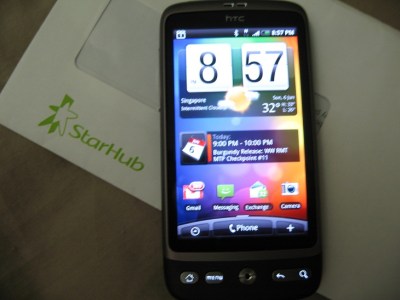
But it took me 2 weeks before I could lay my hands on the desirable phone, as the phone was out of stock island-wide since day 1 due to its overwhelming demand and conservative supplies from HTC (as I understood HTC allocated only 100 units to each telco on day one of its release). Fast forward to yesterday, upon first powered up,  I was first greeted by the familiar shell interface, HTC Sense, which has been around in other HTC Android and Windows Mobile phones. The Android version of the HTC Sense supports a wide variety of widgets, and I believed it is based on Android App Widgets framework. This is a big contrast to the Windows Mobile version of HTC Sense, which has been developed from ground up, based on Lua scripting language. Ok, it sounds little too techie here, but bottomline, you should be able to customise the Android version of HTC sense with other non HTC-sense widgets easily. In the Windows Mobile camp, you would need skilled developers to custom build additional “home tabs” which will only run on HTC-sense powered Windows Mobile devices. That said, I am alittle annoyed with the fact that I can only have 7 “widget screens”, even though I could work around that “limitation” by choosing different “Scene” (each scene has its own set of home widget screens configured).
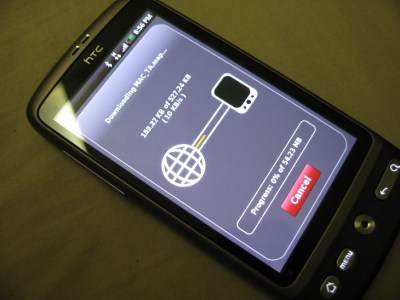
Installation of third party applications into HTC Desire, like any other Android phones (and iPhone if I’ve to be politically correct), is seamless through Android Market.  I installed a few applications, including big installation packages such as NDrive.  There are some installed applications such as SMS widget counter, File explorer,  Bluetooth transfer app, etc which I deemed basic and should be part of the Android base system. Or maybe I have been spoilt by Windows Mobile for the last few years. On the otherhand,  there are good applications such as Tapatalk which I had been hoping for during  the Windows Mobile  days, and I reckon the lack of “easy to use” UI SDK as the main reason why developers are slow in porting their applications to Windows Mobile.

Applications aside, setting up HTC Desire was a breeze, in particular setting up Exchange Server account for my push mail needs. In a few minutes, all my company mails, calendars and contacts were downloaded to the phone. While the PIM features in Desire (or Android phones for that matter) is not as extensive as that in Windows Mobile, it’s  more than adequate for one to connect to workplace, e.g. scheduling a meeting with a list of  invitees,  setting out of office,looking up company’s global address book, etc. And because I had setup my HD2 favorite people previously, the Desire’s favorite widget screen shows the same list of favorite contacts after synchronising with the exchange server. Neat!

Now here comes my biggest gripe(s),  to date. I always pin-secured my phones, and its no different for HTC desire. The problem with HTC Desire, and possibly for any other Android phones, is that if I choose to have numeric pin, I would still face a full qwerty keyboard to enter the pin when I try to slide unlock the phone. It may sounds like nitpicking, but just imagine you have to tap 8 key codes quickly every time you turn on the phone to make a call or do a quick read of new messages. It didn’t help that Android phones (or at least for HTC Desire) seem to have only one single power management mode; regardless of whether the phone is on external power source or battery, or whether the phone is idle or running some active services.

Apart from these gripes, there are other small nags such as occasional screen lags, inability to have full access to application configurations (probably require rooting). Still, I think it has been a refreshing experience, and is the smart phone that is capable of replacing my HD2. This is even more so with the next version of Android, Froyo,  rumoured to be available for HTC Desire in a couple of weeks time, and reportedly to be 5 times as fast as Eclair. Of course, since its made by HTC, one can easily head over to xda-developers to satisfy ones desire for the dark side.

Show Traffic – Another Windows Mobile quicky app

TrafficCamYou may like to call it an iPhone app clone. I got to acknowledged, that iPhone apps, less those mind-less ones, have been churned to serve a purpose in one’s daily life. Traffic CAM SG is one of them, which displays the road traffic in Singapore highways.

However, other than a more intuitive interface as a result of the iPhone UI, there isn’t really a breakthrough functionality that can’t be offered outside of iPhone. The live traffic, is afterall taken from the local authority website (OneMotoring), and I decided to bring this capability to Windows Mobile world.

That said, the Windows Mobile SDK doesn’t really offer gesture-based interface, unless you work in the native C++ environment. Since this application is meant to be a “quicky” one (as I cannot afford to burn my weekend just for this) so I have to design and build based on what compact .NET framework could allow me. This is built in less than half a day, including creating the graphics and the testing of the links, so please pardon this appy for its very basic interface.

Note:  Traffic images and contents are sourced from Intelligent Transport System Centre of LTA (Land Transport Authority). You may go to this OneMotoring link for the online version.

You can download the beta from here (only WVGA/VGA supported at the moment)

Cover the Squeak up

Ever since I got Touch HD, I have a few griefs.

Modified Squeak-less Battery Cover

Modified "Squeak-less" Battery Cover

One of them is performance. After flashing my HD with Dutty’s V3.9 XT Turbo ROM, I felt as if I have gotten a new toy. But the moment I hold up the phone, the squeak on the battery cover put a big dent on the otherwise wonderful HD experience. As I depress on either side of the battery cover, the squeaks just remind me on the squeak and rattles I experienced in my old Volkswagen Bora.

I decided that I have  to do something about it (and give me one less excuse to change my phone!)

Upon inspecting the area where the squeak happens, I identified spots where the plastic on the battery cover is pressing against the phone housing.

All it took for me is a pair of scissor, masking tape, and a small screw driver (or any tool such as tweezers that can be used to position and press the tape on the squeaking area, or just your fingers if you do not have fat thumbs like I do). Stick the tape at the offending area, and you are done literally within a minute!

DIY Tools to mask the squeak

The left hand side of the battery cover

The left hand side of the battery cover

Right hand side of the battery cover; NB: The area above the tape needs to be masked as well

Right hand side of the battery cover; NB: The area above the tape needs to be masked as well

Finally, my HD feels like a gadget with a solid built quality. Maybe it was, but the squeay cover certainly suggests otherwise.

So it looks like I have to wait longer (for an excuse) to ditch my HD. Maybe a HTC Hero might be the one.

Turbo charged iPhone?

3gs_newset_eng01
It always amazed me whenever Apple releases its new products, the technologies it delivered is deemed refreshing, nevermind the industry is already on it for months, if not years.

I recalled reading Steve Job’s argument on why 3G is not bundled in its 2G iPhone product; He said that 3G consumes more battery juice than its predecessor. Yes it does and so does WIFI which can be found in its first generation of iPhone.

Fast forwarding to now, the new iPhone 3G S is touted as a turbo charged iphone 3G with its HSDPA technology. Again it’s a technology found in my Dopod c730 two years ago. Anybody who wants to argue that Apple always does thing better than its competitors should really question how better is it for this context? That we are able to have 3.5G broadband at fraction of power consumption? I don’t think so.

Then BGR has reported undesirable high pitch noise when iPhone 3G S plays some sound files. One site blamed it on the bluetooth headset, and claimed that he had no problem with another. Surely we can infer a more objective conclusion from all these can we?

Posted from my Touch-HD

A touch of Holy Device

I got to admit, the lure of new toy is always so tempting. My Sony Ericsson X1 served me well for the last 8 months, and in fact is the longest holding mobile device I ever have for the last few years. In the current economy climate, it just does not make sense for me to switch to a new toy. Plus, if my verdict on X1 ever suggests, if there’s nothing better than, eh-hm, what else could have turned my head?

touch-hd on the box

Touch HD is a device perfect for watching TV online

So  4 weeks ago when I sent in my X1 to the service center to have the keyboard and some parts repaired,  never would I had expected that would be my last Xperia experience.  It has to do with the infamous crack plastic housing that I requested to be replaced, but I shall not digress further. Fast forward to now,  I ended up selling my X1 back to the service center, and gotten a black stone, a code name for HTC Touch HD.

Continue reading

nothing is better than SE-X

I am talking about the latest gadget in town, Sony Ericsson Xperia X1. What were you thinking?

Perhaps it’s the hype of Xperia, I felt so compelled to experience it when Sony Ericsson finally launched it on 1st November, 9 months after it was first announced.  So I drove down to the Sony Ericsson concept store, on its launch day. My first impression of the phone, was not exactly a “love on first sight” kind of feeling. The phone does look cool on first look (so was the cute sales executive), but my primary concern (as with any other phones) has always been the keyboard and therefore I spent quite a lot testing the keyboard rather than fiddling around its other uber cool features.
Continue reading

Xperia Xperience

I confess, the temptation of new Sony Ericsson Xperia X1 is too much for me to resist.

That said, my first impression of the phone, was not exactly a “love on first sight” kind of feeling, as I dropped by Sony Ericsson concept store to check out the the phone. The phone does look cool on first look (so was the cute sales executive), but my primary concern has always been the keyboard and therefore I spend quite alot trying to experience the keyboard rather than fiddling around its other uber cool features.
Continue reading

A pro touching a Touch Pro

I thought to myself, perhaps the best way to do a mini review on my recent gadget acquisition, is to do write the review using the mobile device itself. It will be a real acid test

to see if the gadget lives up to its name as a truly convergent device, a device that simply allows you to do more than the usual telephony and PIM (Personal Information Management) stuffs you normally find on a typical phone and pda separately and respectively. So the golden questions are … Continue reading

New toy for 3 months

Received an email from Starhub last week that I have been selected for the Mobile TV trial program. Wasted no time to collect the trial phone and took a quick video on the phone in action

More review of the phone and the service in a short while, have too many teleconferences to attend this week!

A “Three-Star”gadget rated higher than three star

Samsung launched its flagship qwerty product, Samsung SGH-i78,0 a couple of months ago and it has been the talking point in the “geek” town. Having tried its previous qwerty models, I had my reservation. The impressive technical specification and corresponding internet reviews, however led me to take a huge step. I finally sold my trusty Motorola Q9h and got myself a Samsung i780. So is this ultra slim Microsoft Windows Mobile-based smart phone liveing up to its reputation? After using it for a few days, here’s my take;

Continue reading